The AI model powering the Product Image Creator in GraFx Labs has been upgraded, resulting in noticeably improved image quality. Product images now render with more accurate detail, better composition, and sharper results — with no changes needed on your end.
Tags let you label and organize templates so they're easier to find and filter across large template libraries. The Tags API endpoints are now part of the public Environment API, making it possible to manage tags programmatically — create, update, delete, and assign tags to templates as part of your integration or automation workflow.
When a new version of an installed connector is available, a notification badge now appears on the connector in both the connector list and the connector settings. You can see at a glance which connectors have an update ready — without having to check each one individually.
The Set as default option has moved from inside connector settings to the three-dot menu on the connector list. This puts the action right where you're already managing your connectors, making it faster to designate a default without navigating into settings. The option is disabled if the connector is already set as default.
Date and time values in environment-level tables — such as Tags and Output tasks — now display in your local timezone rather than UTC. Hover over any date to see the original server time in a tooltip.
Tags, output settings, output tasks, user interfaces, integrations, and subject types now default to sorting by creation date descending. The most recently added items appear at the top, so you can find new additions without scrolling through older entries.
Connector Browser authentication — Setting Browser authentication to [None] while a Server authentication type was already configured incorrectly triggered a validation error. This has been resolved. Browser and Server authentication can now be managed independently without interfering with each other.
Template designers can now define precise constraints on text frames, giving them fine-grained control over what end users are allowed to do when they open a template.
Frame-level constraints — control whether the text frame itself can be moved, resized, or rotated. This lets designers lock down the layout while still allowing content to be changed.
Inline editing constraints — allow end users to edit text directly inside the frame. Designers can choose exactly which formatting options are exposed: paragraph styles, character styles, Brand Kit colors, and font size (with a configurable min and max range).
Inline editing is only available on text frames that do not use variables. Frames with variables continue to use the standard variable editing experience.
Page management in GraFx Studio now includes a Duplicate option in the page context menu. You can duplicate any page in your document and use it as the starting point for a new variation — saving time when building multi-page documents with similar layouts.
Duplicating a frame that uses anchoring now produces a correctly anchored copy. This improvement makes it reliable to build layouts by duplicating anchored frames.
Layout, page, and frame objects in the GraFx Studio template JSON now each carry a unique ID. This gives integrators a stable, predictable reference for every element in a template — useful when building automations or integrations that need to address specific parts of a template by ID.
Character style on variables — A character style applied to a variable could not be removed. This has been resolved.
Autogrow min size — Setting a minimum height or width value larger than the current frame size no longer causes unexpected behavior.
OpenType font rendering — A rendering issue affecting OpenType fonts (including Myriad Pro) has been resolved.
Variable image picker — The message shown when a search returns no results in the variable image picker was incorrect. It now shows the right feedback.
Template name trimming — Leading or trailing spaces in a template name are now trimmed correctly on save.
Text stroke width — The stroke width input field in paragraph style settings was hidden in some cases. It is now consistently visible.
Text edit mode stability — Text edit mode could close unexpectedly after adjusting text settings and then pressing a keyboard shortcut. This no longer occurs.
Private data — Private data fields can now be set to an empty value.
Studio UI — interface dropdown — A Studio UI dropdown was displaying an incorrect current value. This has been corrected.
Subject types are the user-defined categories (such as "person" or "product") that tell the Vision AI what to look for in an image — powering smart crop and other GraFx Genie features.
You can now retrieve subject types for media and external media — either all at once:
GET /vision?expand=allSubjectTypes
or one at a time for a specific asset:
GET /media/{mediaId}/vision/subject-types/{subjectTypeId}
GET /external-media/{externalMediaId}/vision/subject-types/{subjectTypeId}
To update subject types — individually or in bulk — use the extended endpoints:
PATCH /media/{mediaId}
PUT /external-media/{externalMediaId}/vision
Font lists in your integrations now display fallback text when a font preview can't be shown, instead of leaving an empty spot. Note: some fonts may still not preview correctly — a full fix is planned for a future release.
When an existing CHILI GraFx user is invited to a new subscription, they now receive an email notification showing the subscription name and guiding them to sign in with their existing credentials.
Some Photoshop documents contain groups that have effects applied (such as Drop Shadow or Bevel & Emboss) but no layers inside them. These empty groups caused the import to fail. They are now skipped during import, so affected packages load into GraFx Studio without issues.
Documents with many images now generate more reliably. A fix prevents memory from building up during output runs, reducing the chance of failures on complex jobs.
PDF images are now cached during output generation, so they no longer need to be re-processed on each run. Documents that reuse the same PDF images across multiple outputs will be noticeably faster.
This release continues ongoing work to reduce memory consumption during output generation, building on previous improvements to font handling. Documents with many fonts or images should run more smoothly.
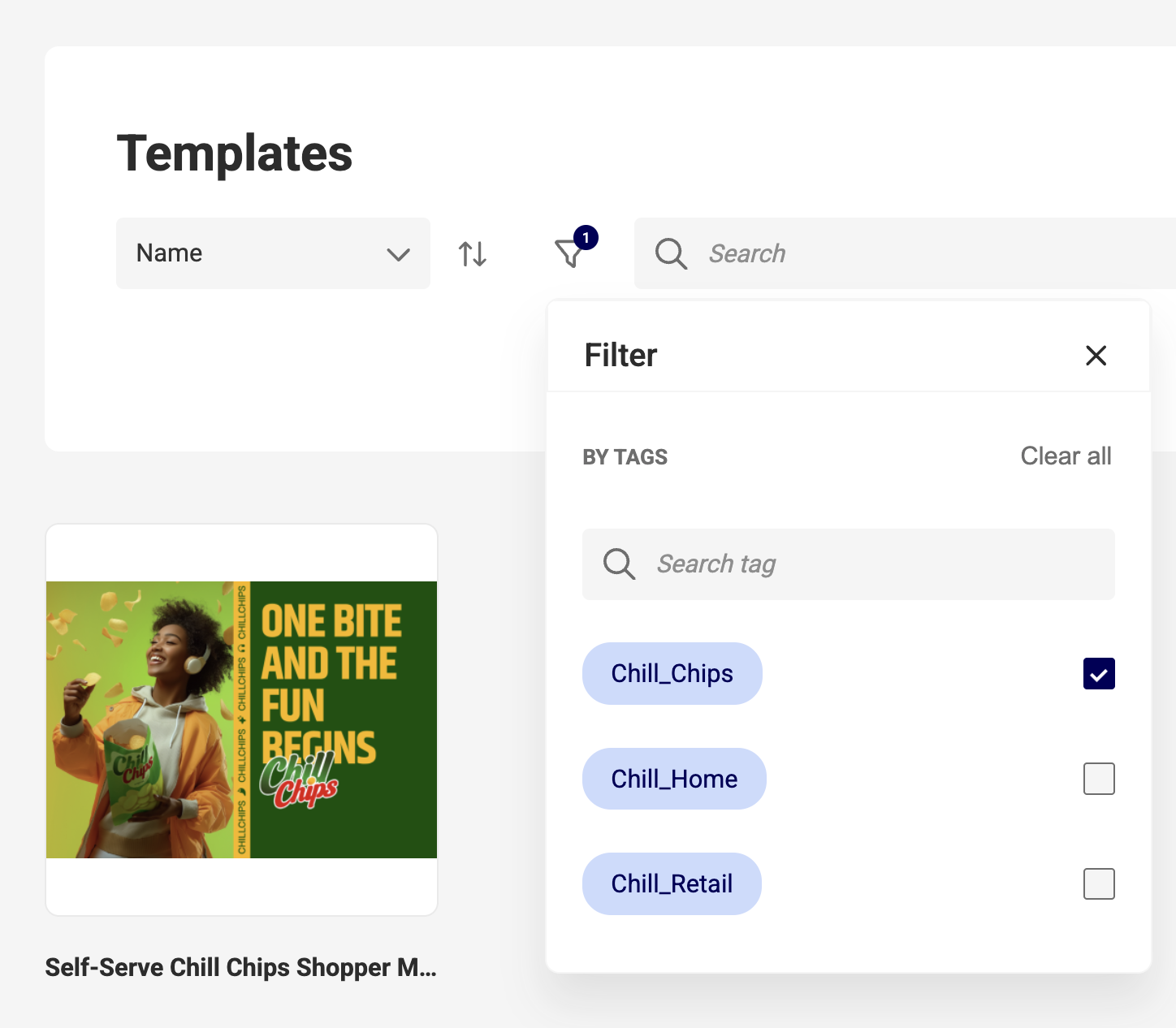
Template designers and environment admins can now use Tags to organize and filter templates in GraFx Studio.
As your template library grows, Tags let you group templates by brand, campaign, or product line — so every designer can filter down to exactly what is relevant to them, without relying on naming conventions or scrolling through unrelated content.
Resolved an out-of-memory issue caused by the font cache growing unbounded during document processing. This fix improves reliability when working with documents that reference a large number of fonts, reducing crashes and failed output jobs in those scenarios.