How to Manage Private Data
You can manage Private Data for variables in GraFx Studio. This allows you to attach custom key-value pairs to a variable, which can be used by your custom integrations, without affecting the Studio UI or end-user interface.
Private data can impact your custom end-user interface. Integrations can use the private data to add tags to variables to trigger specific UI workflows.
Also available on layouts
Private Data is not limited to variables. You can attach the same kind of key-value pairs to a layout — see Private data on layouts.
Manage Private Data
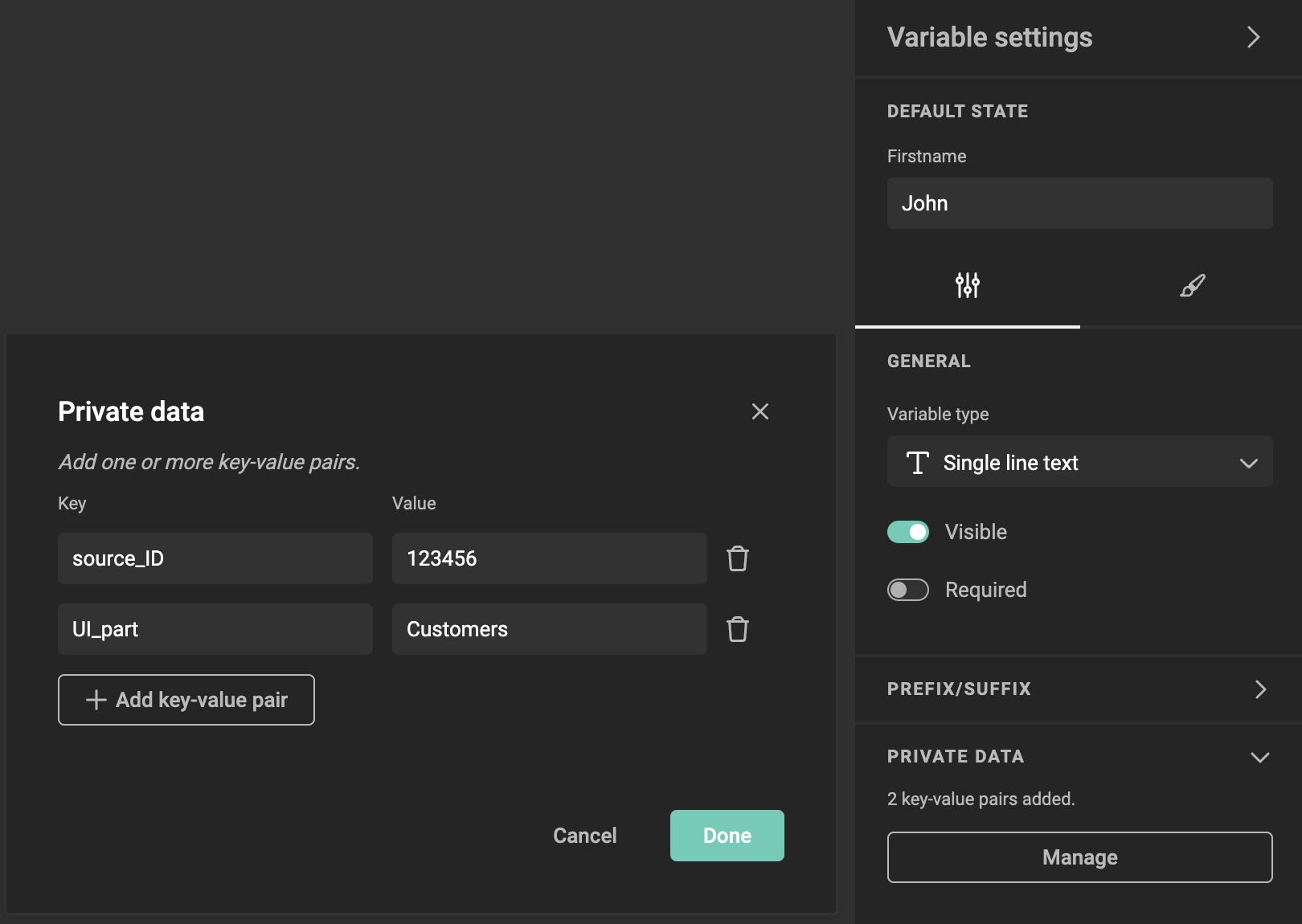
Access the Variable Settings
- Navigate to the Variable Settings panel for the variable you want to manage.
- You will see the Private Data section listed in the variable settings.
Open the Private Data Section
- In the Private Data section, click Manage to access the private data editor.
Add Key-Value Pairs
- Click the Add key-value pair button to create a new entry.
- In the Key field, enter a custom identifier (e.g.,
source_ID). - In the Value field, input the corresponding value (e.g.,
123456). - You can add multiple key-value pairs to a variable, depending on your integration needs.
Edit Existing Key-Value Pairs
- To modify an existing key or value, simply click on the text in the field and make your changes.
Warning
Be cautious when changing values. If you modify the Key, it may impact your integration. For example, changing source_ID to SOURCEID will require an update to your integration to recognize the new Key.
Delete Key-Value Pairs
- To remove a key-value pair, click the trash icon next to the entry you want to delete.
Warning
Deleting a key-value pair may affect your integration.
Save Your Changes
- Once you’ve added, edited, or deleted key-value pairs, click Done to save your changes.
- The key-value pairs will now be stored with the variable and can be used by your custom integration.
Info
Known behavior: If you edit key-value pairs without saving and then modify the variable contents, any unsaved key-value pairs or updates will be lost.