Overview
CHILI GraFx
Big platform API Update
CHILI GraFx

CHILI GraFx Platform API 1.11
Features
User management
- Added endpoints for disabling and enabling users in the subscription
Manage Integrations
- Added endpoints to create, update, delete Integrations
- Added endpoint to get details of a single Integration
- Added endpoint to get available scopes for an Integration
- Added endpoint to Rotate client secret
- Added endpoints to manage scopes of Integrations
Authentication
- Add support for the bearer token with new grant type
- Add support for scope-based authorization rules
GraFx Publisher plug-in for Adobe Illustrator®

Features
- Added support for Adobe® Illustrator®1 2023 (27.x)
Improvements
- Preflighting a document is no longer adding items to the undo/redo stack
- When converting a document you are no longer prompted with a message for every text frame that contains right alignment
Resolved issues
- Fixed issue with the plug-in panel going blank when reopening
- Fixed issue with missing images in documents exported to GraFx Publisher from macOS
- Fixed issue with failing conversion for documents containing circular text
- Fixed issue with upload when using heavy assets on Windows
- Fixed issue where the document name was not updated in the plug-in when opening a new document
This version is compatible with Adobe® Illustrator®1 2022 (26.x) and 2023 (27.x).
This version is compatible with GraFx Publisher and the on-premise version of CHILI publisher (version 5.6 or above).
GraFx Publisher
Fixes
- Editor: Fixed issue where iframe caused the page to scroll when partially outside of view
- Editor: Fixed issue with transparent selection
- API: Removed redundant calls to file system to minimize probability for concurrency issues
- API: Fixed issue with ResourceSearchInFolder not returning items in response if includeSubDirectories property was false
- API: Strengthened security on REST API
GraFx Studio
Version 0.123.1, using Studio SDK 0.123.0

Features
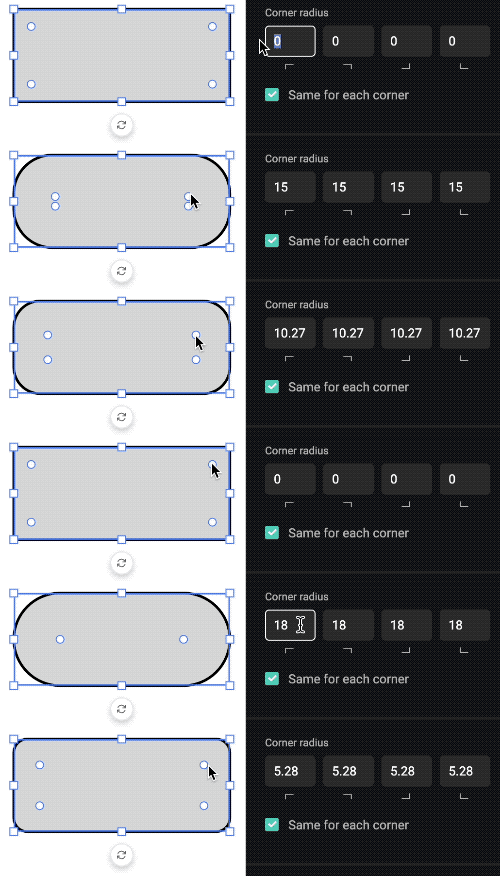
- You can change the corner radius of your rectangle and polygon shapes by dragging the round handles in the shape or by using the corner radius properties in the frame properties panel
Improvements
- When a new frame is added it is only visible on the selected layout and its sub-layouts, on all other layouts the frame is hidden (if you want a frame to be visible on all layouts you should add it on the top-level layout)
CHILI GraFx
Fixes
- Updated error message if you want to invite more than 10 users at once to CHILI GraFx
- Disable 'Add Template Designer Seat' button when all Template Designer seats are assigned
- Fix issue with logout button on 'MyAccount' page
GraFx Studio
We are working hard on delivering an end-to-end process, from Smart Templates created by designers to output generated by end users. Check out the template management page to learn more about this new way of working.
The first step in this process is organizing your templates in collections. This is available now!
In the next step, end users will be able to browse the collections and start a project from one of the templates. The project will be opened in a user-friendly interface where you can make changes and generate output.

GraFx Studio
Version 0.122.1, using Studio SDK 0.122.0
Features
- You can crop an image to manually resize and position it inside an image frame
- Snap guides show up when creating, moving or resizing a frame to help you to nicely align the frames in your design


Improvements
- You can use the arrow keys to move a frame in steps of 1 pixel, holding down the Shift key moves it in steps of 10 pixels
- Creating, moving or resizing a frame is now done on a pixel grid, meaning that the x, y, width, and height properties have non-decimal values
- Punctuation marks stay together with the preceding word and will not move to the next line
Fixes
- Fixed issue where the animation sometimes blinked at the beginning or the end
- Fixed issue where changing the width or height of a frame also caused an override on other properties
- Fixed issue with constraining proportions when changing the width or height of a frame in the properties panel